Contacts on BOT
From the adapterProvider, we can utilize the store property to fetch all contacts, store them in a variable, and subsequently display them to the user. This property has the following signature:
(property) BaileysProvider.store?: {
    chats: KeyedDB;
    contacts: {
        [_: string]: Contact;
    };
    messages: {
        [_: string]: {
            array: proto.IWebMessageInfo[];
            get: (id: string) => proto.IWebMessageInfo;
            ... 7 more ...;
            fromJSON: (newItems: proto.IWebMessageInfo[]) => void;
        };
    };
    ... 18 more ...;
    readFromFile: (path: string) => void;
} Contact structure:
Contact {
    id: string;
    lid?: string;
    name?: string;
    notify?: string;
    verifiedName?: string;
    imgUrl?: string | null | 'changed';
    status?: string;
}app.ts
import { createBot, createProvider, createFlow, addKeyword, EVENTS } from '@builderbot/bot'
import { BaileysProvider as Provider } from '@builderbot/provider-baileys'
import { MemoryDB as Database } from '@builderbot/bot'
import { config } from 'dotenv'
config()

const PHONE_NUMBER = process.env.PHONE_NUMBER
let contacts = {}

const welcomeFlow = addKeyword<Provider, Database>(EVENTS.WELCOME)
    .addAnswer(`💡 Example *Contacts on BOT*`)
    .addAction(
        async (_, { flowDynamic }) => {
            const contactsBot = Object.entries(contacts)
                .map(([id, data]) => ({ id, name: data }))
            await flowDynamic(`Total contacts: ${contactsBot.length}`)
            const messages: string[] = []
            for (const grupo of contactsBot) {
                const message = `${grupo.name ? 'Object:' : ''} ${JSON.stringify(grupo?.name, null, 5) || ''}\n*id:* ${grupo.id}`
                messages.push(message);
            }
            const concatenatedMessages = messages.join('\n\n')
            await flowDynamic(concatenatedMessages);
        }
    )

const main = async () => {
    const adapterFlow = createFlow([welcomeFlow])

    const adapterProvider = createProvider(Provider, { usePairingCode: true, phoneNumber: PHONE_NUMBER })
    const adapterDB = new Database()

    const { handleCtx, httpServer } = await createBot(
        {
            flow: adapterFlow,
            provider: adapterProvider,
            database: adapterDB,
        }
    )

    try {
        adapterProvider.on("ready", () => {
            if (adapterProvider.store && adapterProvider.store.contacts) {
                contacts = adapterProvider.store.contacts
            }
        })
    } catch (error) {
        console.log(error)
    }
}

main()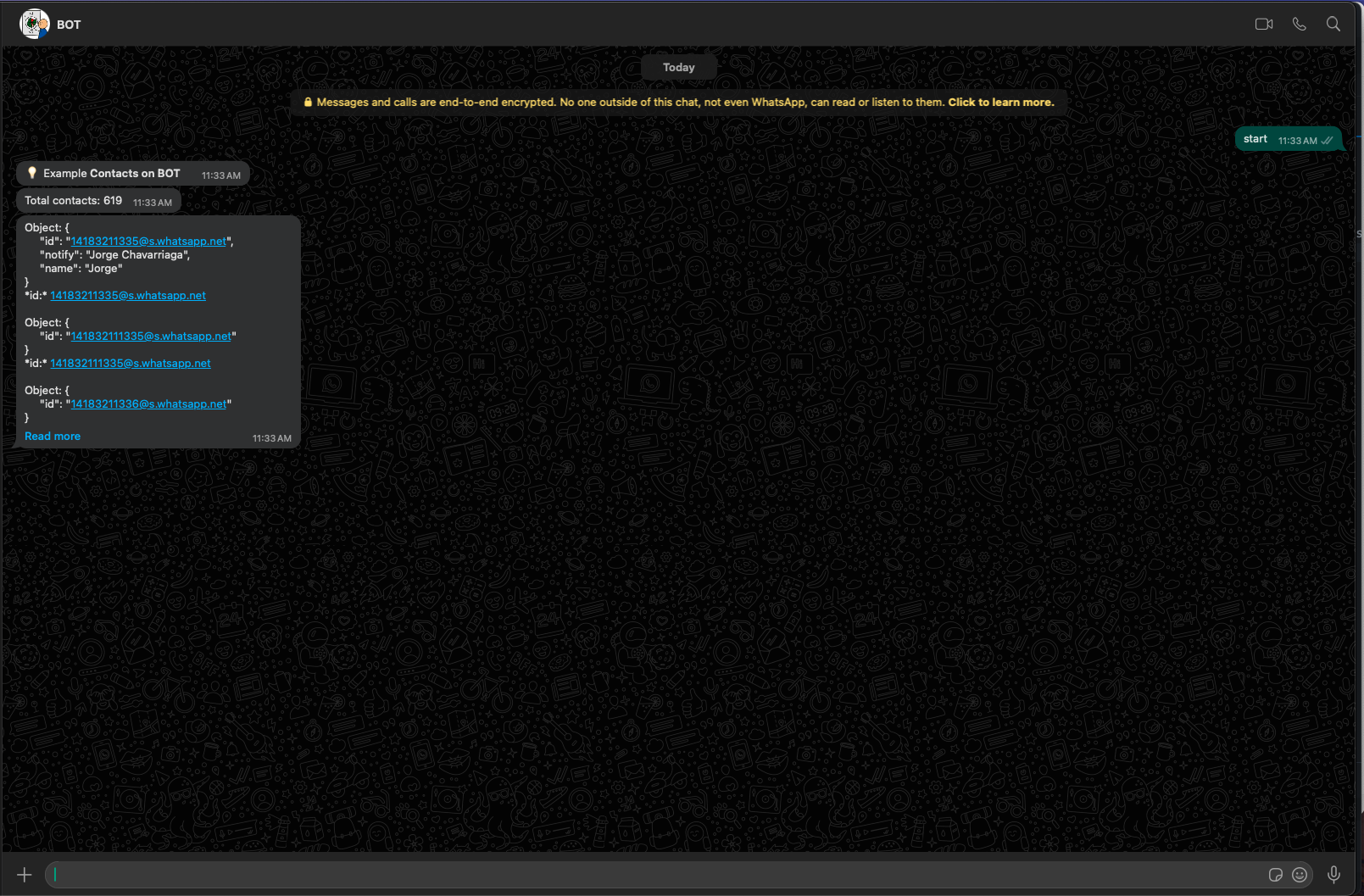
Resources
Modularize
Learn how to modularise flows so that you can have a more maintainable bot.
Send Message
How to send a message via HTTP to start conversations, you can send multimedia as well.
Dockerizer
A good practice is to dockerise your bots to make them more maintainable and effective.
Events
Learning about events will make us more fluent when creating chatbots.